
Look Both Ways Before You Step Out: Looking Back at Virtual 2020 as we head into Hybrid 2021
The end of the first quarter of 2021 marks a full year of the events industry in a Covid world. I think this is a good time to look back at the year past, and to look forward to my view of what's next for our industry.
I am also excited to be in a ballroom again, but I don’t think we’re quite going to just jump back into where we left off when the industry froze in Q1 2020, and I don’t think we should want to.
The end of the first quarter of 2021 marks a full year of the events industry in a Covid world. I think this is a good time to look back at the year past, and to look forward to my view of what's next for our industry.
I previously wrote about virtual events early in the pandemic - in March, and in April, Twice.
Take a look back and see how many of my predictions came true and how many rang hollow.
In the meantime, I’ve spent the last year producing virtual events - ranging from 1 hour webinars to 5-day flagship conferences - and my calendar is rapidly filling for the rest of 2021 with virtual and hybrid events. I know everyone in the event industry is itching to get back to “normal” - I am also excited to be in a ballroom again, but I don’t think we’re quite going to just jump back into where we left off when the industry froze in Q1 2020, and I don’t think we should want to.
Businesses large and small, and their target audiences, have discovered the power of virtual events - events without travel and catering budgets, events that span the globe, with presenters and attendees that would never have been able to come in person. Virtual productions provide increased accessibility of events to parents who can’t leave their kids at home, increased accessibility of events to people with disabilities that make attending face-to-face events difficult, and provide increased accessibility of events to independent professionals, small business owners, and students who may not have the time or resources to travel to an in-person event. Bigger events with broader audiences, or multiple smaller events for hyper targeted audiences, whichever makes more sense. Instantly evergreen content you can re-share, re-edit, and combine with other content to re-sell. With tremendous ROI of virtual, why would we want it to stop?
Enter Hybrid. I know that “hybrid events” is a buzzword of the moment, but really it’s not a new concept. Our industry has been producing hybrid events for years, we just didn’t describe them that way.
I’ve streamed millions of viewer-hours of live event video from in-person events. I remember first producing events that brought in individual speakers via teleconference almost a decade ago. TV news bridges an in-person studio with remote presenters 7 nights a week. The idea of serving both an in-person and remote audience simultaneously is really not unusual, but in the events world prior to 2020 it hadn’t been the default. The tools and techniques have existed for a while - what I think will change is the expectation and “normalcy” of virtual components in almost any event

A woman in a floral top and a man in a blue shirt smile in a screenshot of a Zoom call. The zoom interface is visible. Photo by visuals on Unsplash
Just like every event for the past several years has needed to be ready to play audio and video someone’s slide presentation, even if it’s not in the “spec”, I think every event going forward needs to be ready to add a presenter via Zoom or Teams or Meet. I think teleconference in and stream out is a default assumption for any in-person event going forward. Any event from a flagship conference to a PTA meeting will need the ability to add a call-in option at the last minute, with no fuss.
Another change I expect to stick is the shifted and elongated event cycle. As we think about the event ecosystem, and as event dates have been shaken up due to COVID, something has shifted - events are now year-round. We have less defined “event seasons” with bookend or flagship events, and more ongoing events as part of broader outreach and marketing efforts.
There is less waiting for the big tradeshow to announce products, and more year round marketing drip. Even one-off events are part of a broader marketing ecosystem, and clients need all events to align with their broader communication goals, online or off.
As in-person events return, and as clients evaluate their goals and event needs, I expect to see more roadshows, smaller regional events, and overlapping regional events that are connected via video technology to bridge in-person speakers and audiences across multiple venues and locations.

Woman in a green dress uses a VR Headset in an art gallery. Photo by Sophia Sider on Unsplash
As high profile clients focus on adding pizzaz to their events, we move into an area where hybrid gets interesting and we get beyond the basic stream or Zoom call. Under the hybrid-event umbrella, there are some newer technologies and techniques that have really gained traction over the past year. I expect to see more events using consumer-facing VR and AR technology and studio side xR tech, 3D virtual sets, and volumetric stages along with Unreal Engine, disguise, and other media server environments to make the experience for the online audience more immersive than your average zoom call.
Another tech innovation I expect to see more of is the Pepper's Ghost “hologram” on stage. It was used to much fanfare to “resurrect” beloved performers at music festivals over the last few years, and I expect it to be used to “beam” CEOs and keynote speakers into multi-site conferences to allow “embodied” presentations to remote audiences when executives can’t travel or events overlap.
There are many more technologies, techniques, and event formats on the horizon. As you plan online, in-person and hybrid events, think about the specific takeaway you want the audience to have before you pick a format or technology. Keep in mind audiences you might have missed in the past, and how you can bring your event and message to a more diverse audience who might experience your event differently than other attendees. Consider ways to make your event more accessible to people with a variety of different personal, ability, and travel needs. Think about the experience you want each person in your audience to have and define the goals for takeaway and experience first, then pick the platform, format, or venue that best fits those needs. For some events an online-first approach may still offer the best ROI. Where in-person components fit the bill, remember that there are a myriad of options to bridge an in-person and online experience to maximize impact.
Tim Kerbavaz is the Technical Director of Talon Entertainment Audio Visual.
Talon AV provides virtual and in-person event production services for private, corporate, and community events across the United States. Serving a wide range of events, from political round-tables, to Silicon Valley Tech Company Conferences, to community festivals, to automotive-industry board meetings, Talon Entertainment Audio Visual provides technical expertise and an exemplary attendee experience.
Improving Virtual Meeting Attendee Engagement with an Interactive Coffee Break
Let’s take this online
In mid May, the staff at Veloz, a nonprofit organization focused on electrifying transportation in California, came to me with a challenge. Their July member meeting, scheduled to be an in-person round table in Downtown Los Angeles, was going to be impacted by COVID-19 travel restrictions. Like most event planners, they wondered how to take the meeting online. The conference involved 50 members around a table discussing state policy, industry marketing, and increasing member investment. How would we move it to an online format while maintaining the networking, conversation and attendee engagement of the in-person meeting? How could we make members feel valued and invested in the organization without being with them in person?
Let’s take this online
In mid May, the staff at Veloz, a nonprofit organization focused on electrifying transportation in California, came to me with a challenge. Their July member meeting, scheduled to be an in-person round table in Downtown Los Angeles, was going to be impacted by COVID-19 travel restrictions. Like most event planners, they wondered how to take the meeting online. The conference involved 50 members around a table discussing state policy, industry marketing, and increasing member investment. How would we move it to an online format while maintaining the networking, conversation and attendee engagement of the in-person meeting? How could we make members feel valued and invested in the organization without being with them in person?

Author and Technical Director Tim Kerbavaz takes a selfie during a session break while managing the webinar from the client’s office.
They were familiar with Zoom, and already had a Webinar license, but weren’t sure how to ensure good audio and video quality as their Executive Director hosted the meeting. They also wanted to provide an extra level of engagement for their members as they participated in the meeting.
In order to ensure that all the member organizations were able to participate in the discussions, each member was asked to designate one delegate to have a seat at the virtual Zoom Webinar table. These appointed delegates were invited to the webinar as panelists, so that they could participate in the round-table discussion. Any other member representatives, or attendees from non-member organizations, were enrolled as listen-only attendees to streamline the conversation in the meeting.
In addition to pre-production planning, Talon provided onsite AV support at the Veloz office. We turned a conference room into a studio with camera, lighting, and audio equipment, allowing the Director to host the meeting on camera with high-quality video. Talon staff remotely controlled the production from down the hall in an office suite to preserve social distance and prevent noise or distraction on camera.
Make your guests feel at home, at home

Custom Camping-Style Coffee Mugs were sent out along with freshly roasted coffee beans from a local roaster.
To ensure members felt valued, and to ensure they were alert and attentive for the meeting, each member delegate was sent a Veloz-branded coffee mug and a bag of locally-roasted coffee. We partnered with Sacramento, CA -based Seasons Coffee Roasters. Seasons offers a retail mail-order coffee service, as well as wholesale beans for retail and foodservice, so they were a natural fit to enlist for both coffee and fulfilment of the gift packages. Boxes were shipped to arrive at attendees homes the weekend before the event, to allow plenty of time to enjoy the coffee and be ready for the meeting.
What’s that sound?

Screenshot from the webinar of DJ Jon VonRonk spinning records for the conference audience.
To set the tone of the meeting, attendees were greeted by Sacramento local vinyl DJ Jon VonRonk from Kicksville Vinyl & Vintage spinning records on the webinar, joining us live from his home studio. Because the audio from the DJ’s studio was music, not speech, Zoom’s standard audio processing would have interfered with the quality of playback. To prevent this, we adjusted some key audio settings within Zoom to disable the noise and echo cancellation processing, ensuring the highest possible music fidelity in the webinar environment. While the music played, attendees were presented with some light-hearted polling questions designed to spark conversations and encourage creative thinking before the discussions began in earnest.
Feel-Good Impact
Many members made a point to have their coffee mug in the frame for the call, even a few who admitted it was filled with water because they preferred tea or cocoa to coffee. Throughout the conference, and in a subsequent meeting of the same group, members exclaimed how exciting it was to have a DJ open and close the meeting. “I’ve never been to a webinar with a live DJ before” said several attendees. Some guests lamented that they don’t have music to greet them at all their conferences.
Overall guests responded with great excitement to the “virtual coffee break” and it provided a great example of combining creative attendee engagement tools to keep virtual event attendees interested and connected to the meeting and message.
Tim Kerbavaz (he/him) is the founder and Technical Director of Talon Entertainment Audio Visual as well as a freelance Technical Producer with over a decade in corporate event production after an early career in live music production management. As both a live event technology professional and a creative geek, Tim serves as an event technology sherpa, guiding clients through production and technology decision making and delivering events to production bliss.

7 Questions About Event AV Your Team Needs to Ask
So you’re planning a meeting. You’ve got a venue picked out, you’ve got your speakers lined up, and your boss is ready to sign off on your plan. But Wait! What about your Audio/Visual plan? Make sure you and your team think about these questions before you sign off on your event.

When you plan an event, make sure you and your boss are asking these questions before you sign on the line. If you are the boss, then make sure you pay attention.
So you’re planning a meeting. You’ve got a venue picked out, you’ve got your speakers lined up, and you (and/or your boss) are ready to sign off on your plan.
But Wait! What about your Audio/Visual plan? Have you thought about your AV needs? Who your suppliers are going to be? Make sure you and your team think about these questions before you sign off on your event.
Do you have your AV needs documented? Make sure you know what you need AV wise, and that you arrange in advance to make sure it’s all ready for your event. Whether you provide the AV yourself, or you hire a company to do it for you, make sure you make a plan and stick to it to avoid last minute surprises.
Are you comfortable setting up yourself? If you are, then you’re all set. If not, do you need to call Steve from IT to set something up? Or is Anita from Accounting your Go-To setup wiz? No matter who you have doing the setup, make sure you know in advance who that will be and you schedule them to be there.
Do you need to bring in a professional? Remember both Steve from IT and Anita from accounting have a full-time job. Does taking your skilled employees away from their desk really make the most sense? Sure, if it’s just hooking up a laptop in the boardroom, it’s no problem, but if you’re taking them away for a long period of time, doesn’t it make sense to hire a professional?
Does your Venue provide AV support? When you’re looking at off-site meetings in Hotels and conference centers, find out what’s included in your rental. Does the room come with drop-down projection screens? Do you have to pay extra for the projector? Does a lectern and riser come with the rental, or does that cost extra? Do you have to arrange with the AV team separately, or is there a default setup? Will a technician be in the room the whole time? Will there even be a tech onsite? How much does that all cost?
Is in-house AV your best option? The answer to this is often no. Did you know that at most hotel properties, the in-house AV is not done by the hotel, but by a 3rd party company that pays to be the prefered provider? These companies often pay a 40-50% commission on the rates you pay back to the hotel. They also don’t usually travel to other locations, and have different crews for each property, so you’ll have different technicians at every event you do. They may be a great value and are certainly a great onsite resource, but they may not be your best choice, which brings us to #6:
Did you red-line exclusivity agreements in your venue contract? Given that they get 40% back from the in-house AV vendor, venues often have exclusivity clauses in their contracts which will require you to use the onsite provider. These can almost always be negotiated off the contract - the hotel salespeople are in the business of selling meeting rooms and guest rooms. While they like the AV kickback, it’s almost never a deal breaker for them, but it should be one for you. This doesn't rule out using the in-house AV, in fact they may be a great option, but if you redline the exclusivity clause, you have the option to use whoever you want, and the in-house has to be more competitive.
This is the most important question - Did you schedule time for your own breaks? You, your staff, Steve, Anita, and your AV crew all need to eat, rest, and use the restroom. Did you build in breaks for self-care, and schedule coverage for your positions while you’re gone? Your boss needs you in one piece, and you need your staff and crew in tip-top shape. Take care of yourself, eat, and don’t forget to drink water!
You want how many microphones?
“You want how many microphones?”
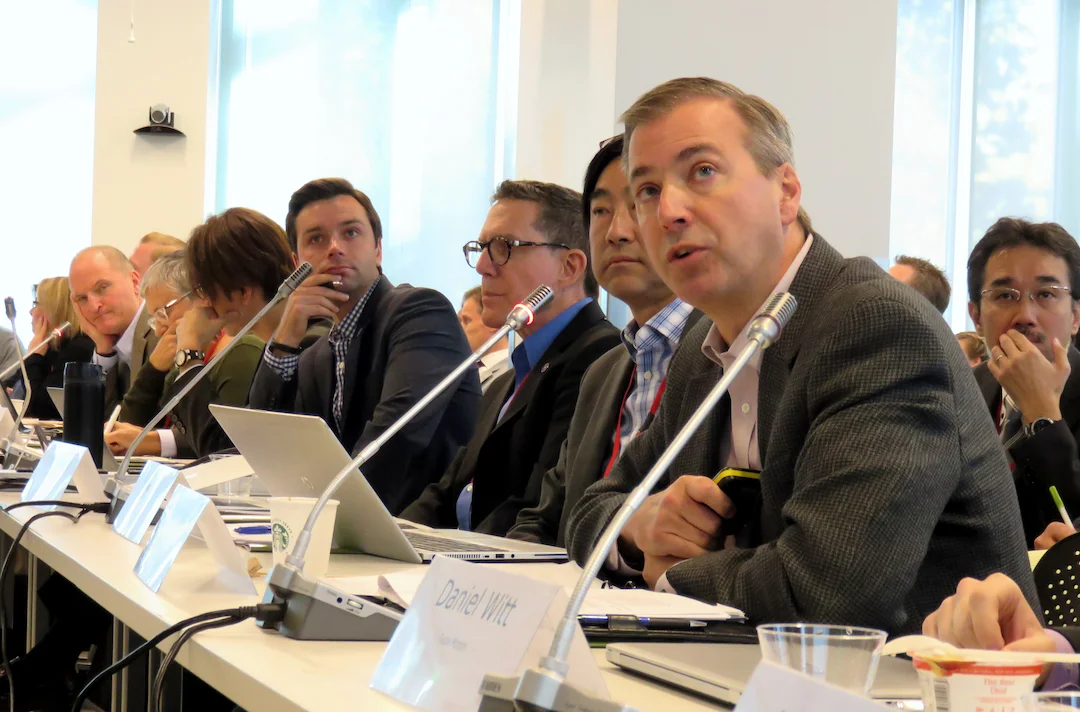
I’ve found myself asking clients that question on many occasions. Big board meeting. National membership meeting. Round-table committee discussion. Meetings where there are 30 to 100 people who all need to be able to hear and be heard.
I’ll be honest -- you cannot have 50 microphones live at once in one meeting room without digital processing and expect to not have feedback. There’s no way one sound technician can manually keep track of who’s speaking and who’s up next and keep it all going smoothly. It’s not going to be pretty. And think of how many cables you’d need!
Luckily there’s a solution that lets everyone have a mic, prevents feedback, and keeps technicians from ripping their hair out.
It’s called an Audio Discussion System, or alternately known as a “Congress” or push-to-talk system.
“You want how many microphones?”
I’ve found myself asking clients that question on many occasions. Big board meeting. National membership meeting. Round-table committee discussion. Meetings where there are 30 to 100 people who all need to be able to hear and be heard.
I’ll be honest -- you cannot have 50 microphones live at once in one meeting room without digital processing and expect to not have feedback. There’s no way one sound technician can manually keep track of who’s speaking and who’s up next and keep it all going smoothly. It’s not going to be pretty. And think of how many cables you’d need!
Luckily there’s a solution that lets everyone have a mic, prevents feedback, and keeps technicians from ripping their hair out.
It’s called an Audio Discussion System, or alternately known as a “Congress” or push-to-talk system.

A push-to-talk system in use at a business meeting.
A Discussion System can come in multiple styles and feature sets, from installed systems with voting, speaking order tracking, translation, and video displays (as is used at the United Nations), to wireless systems with multiple zones, to simpler portable systems with basic push-to-talk microphones and fewer frills.
All of these systems offer simple wiring, as most allow the mics to daisy-chain around the table. They also have a central processor that both limits the number of simultaneous mics that are turned on as that processes and adjusts the audio on the fly, preventing feedback and excessive room noise in recordings and conference calls.
Each mic unit has a push to talk button on the mic base, and in many of these systems the base contains a small speaker, allowing all the participants to hear each other clearly without external speakers, and all can all be plugged into external sound systems for reinforcement, conferencing, or recording.
These systems provide a solution for events where everyone needs to be heard. They are typically used with audiences seated around a U-shape or hollow square table arrangement, with all the participants around the room facing in, or with rows of delegates in classroom style or tiered seating all facing a central dais or head table. They can be used with one mic station per seat, or spaced between alternating seats, with one mic for every 2 people.
We typically recommend that no more than two people share a discussion mic, because the bases are daisy-chained together. With a wire running in each direction, it’s best that they not be picked up and moved so the cables from the other units won’t be pulled too much.
If you are planning a large board meeting, or you’d like a large group to be able to have a round table discussion, with or without an off-site teleconference, a multi-mic discussion system is a solution worth exploring. We carry a range of these systems, and we’d be love to chat about your event. We’re in California, but if you’re curious about how these systems work, feel free to drop me a line no matter where you are -- I love to geek out about AV technology, especially if it helps folks find solutions to their event technology problems.